Reapit Integration
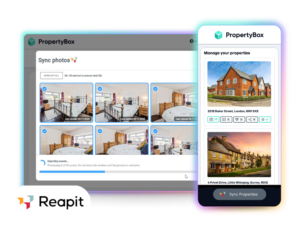
Two platforms. One seamless workflow.
Bring together the trusted workflow of Reapit Agency Cloud with the marketing power of PropertyBox. Launch listings faster, reduce admin across your team, and stay one step ahead in a market where speed and presentation win instructions.
Instant property setup
Launch PropertyBox from any Reapit property record and your listing is ready in seconds. Address, property type, bedrooms and more are pulled through automatically, so there’s no need to re-enter data.
One-click asset sync
Send photos, floorplans, 360° tours and portal campaign links straight back into the correct Reapit record. No downloads. No uploads. Just clean, connected data.
Live order tracking
Stay on top of every instruction. Pro Content order updates flow directly into Reapit, giving your whole team clear visibility without chasing or switching systems.
How it works
No manual uploads. No duplicated work. Just one connected workflow.
Sync properties
between platforms
Open either platform and connect properties between the two instantly. Your property details are imported automatically and ready to use.
Create your marketing in PropertyBox
Order Pro Content or create marketing assets including photos, floorplans, 360° tours and portal campaigns, all in one place.
Track progress in
Reapit
Stay updated at every stage. Order statuses flow back into Reapit automatically, so your whole team stays aligned.
Sync assets back in one click
Push completed photos, floorplans, tours and campaign links straight back into the correct Reapit record. No manual uploads, no duplicated work.
What’s included in the integration
Everything you need for seamless working.
Connected data sync
Property details flow from Reapit into PropertyBox, while marketing assets and updates sync straight back, keeping everything aligned without manual work.
Automatic property creation
Launch PropertyBox and your property is set up instantly using data pulled directly from Reapit.
Marketing asset creation
Produce high-quality listing content, enhanced images and campaign assets designed to attract more attention.
Media syncing
All assets sync back to Reapit, keeping records accurate and ready for portals and marketing.
AI-enhanced visuals
Improve image quality, generate listing content and create campaigns that help your properties stand out.
Centralised workflow
Manage property data, marketing and updates in one place, with full visibility across your team.
Frequently asked questions
Complete the integration request form here and our team will work to get the integration set up. You will need to have an existing PropertyBox and Reapit subscription.
You have two options.
1. Open a property record in Reapit and select the PropertyBox app from the Reapit Marketplace.
2. Open PropertyBox and select Sync Properties
On first launch, a corresponding property record is automatically created in PropertyBox. The following details are imported from Reapit:
– Address and formatted display address
– Property type and number of bedrooms
– Property description and listing URL (if available)
This import happens once only. Subsequent launches from the same property will not overwrite or update the PropertyBox record.
This integration only syncs what you select, giving you more control. You can select which properties to sync to PropertyBox, and then which assets to sync back into Alto.
Once you have your final assets in PropertyBox, you can sync the following directly into the correct Reapit property record:
– Photos
– 360° tours
– Portal campaign URLs (streaming links)
Yes. The integration will display a clear prompt when assets are available in PropertyBox but have not yet been synced to Reapit, reducing the chance of missing or incomplete marketing materials in your property record.
Yes. When a Pro Content order is placed through PropertyBox, status updates are automatically sent into Reapit so you can track progress without switching systems. The following statuses are supported:
– In Progress
– Awaiting Photographer Acceptance
– Awaiting Appointment Details
– Appointment Details
– Updated Appointment Details
– Complete
– Campaign Advert Complete
– Cancelled
Reach out to our support team and they will be able to help you resolve any issues with the integration.