
Contents
Share
Social media has become essential for estate agents looking to connect with clients, showcase their property listings, build their brand and win new instructions.
Social media marketing for estate agents isn’t optional. It’s essential. We know the internet is the go-to place to search for property but movers are increasingly focussing on social media. For example, a Rightmove survey revealed 65% of homebuyers in the UK use social media to explore new properties.
With billions of people using social media every day, estate agents need a marketing strategy to drive engagement and find potential customers. But managing social media can feel overwhelming and even impossible, especially if you’re short staffed or less experienced on the platforms.
The good news is social media management for estate agents doesn’t have to be overwhelming.
In this blog, we’ll walk you through simple steps to building your marketing strategy and getting started.
These straightforward tips will help you navigate social media with confidence and expand your reach, growing both your agency’s profile and your personal brand.
Why use social media?
It’s important understand your “why” before getting started?
Social media isn’t just about likes and hashtags – it’s a powerful tool for estate agents to build trust, drive brand visibility and reach potential customers.
A growing number are turning to platforms like Instagram, Facebook and TikTok to explore neighbourhoods, property styles and shortlist companies they might like to instruct. Never underestimate the power of social media marketing for estate agents: 76% of home buyers found their estate agent through social media, with 41% of those using Instagram as the primary platform.
Millennials and Gen Z make up over 50% of the housing market and they use social media as a research tool. In fact, research by Mojo Mortgages found 52% of first-time buyers browse properties on social media at least once a week, with the figure rising to 58% for those aged 25 to 34.
As well as targeting active movers, social media marketing for estate agents creates your future pipeline. It builds a recognisable local brand and ensures your agency stays front-of-mind when people are ready to move.
Read more about Marketing Property to Gen Z
Set your goals
Pull from your why
Once you’ve identified why social media matters to your business, the next step is setting clear goals.
What do you want your social media presence to actually do for you?
- Generate more valuation leads
- Win more instructions
- Showcase your property portfolio
- Reduce withdrawals
- Build community credibility
Whether it’s increasing website traffic, getting more enquiries, or simply growing awareness in your local market, setting focused goals will shape the kind of content you create and how you measure success.
Know your audience
Who are they? What do they care about?
To create content that connects, you need to understand who you’re talking to.
Are your ideal clients first-time buyers looking for reassurance and education? Downsizers who care about location and lifestyle? Local landlords seeking trusted partners?
Knowing your audience helps you post content that resonates – whether it’s market tips, community updates, behind-the-scenes property prep, or quick video tours. When you speak to what your audience values, you’re more likely to earn their attention and their business.
Pick your social channel(s)
Not every platform serves the same purpose, and not every agent needs to be on all of them.
Start with one.
Facebook is great for community engagement and reaching older homeowners; Instagram is ideal for visual storytelling, behind-the-scenes posts, and property photos; TikTok is fast becoming a hotspot for agents who want to showcase personality, educate, or tap into younger audiences; and LinkedIn can work well for commercial property or luxury listings.
Choose platforms that align with your audience and business goals – and focus your energy where it counts.
Read our blog The Estate Agent’s Guide to Instagram to learn more about using Instagram
Plan your content
You have to think about both content format and themes (or buckets as we like to call them).
Where content formats are video, images, carousels, stories, polls etc, content ‘buckets’ are the core content topics or themes you’ll post on your social media accounts.
These should be topics you think will resonate with your target audience that you can create content for regularly.
💡 Bonus tip (shameless plug): PropertyBox makes creating social content and posting easy.
You’ll want to keep this to around 4/5 content types. This allows you to have variety in your content without diffusing your online brand.
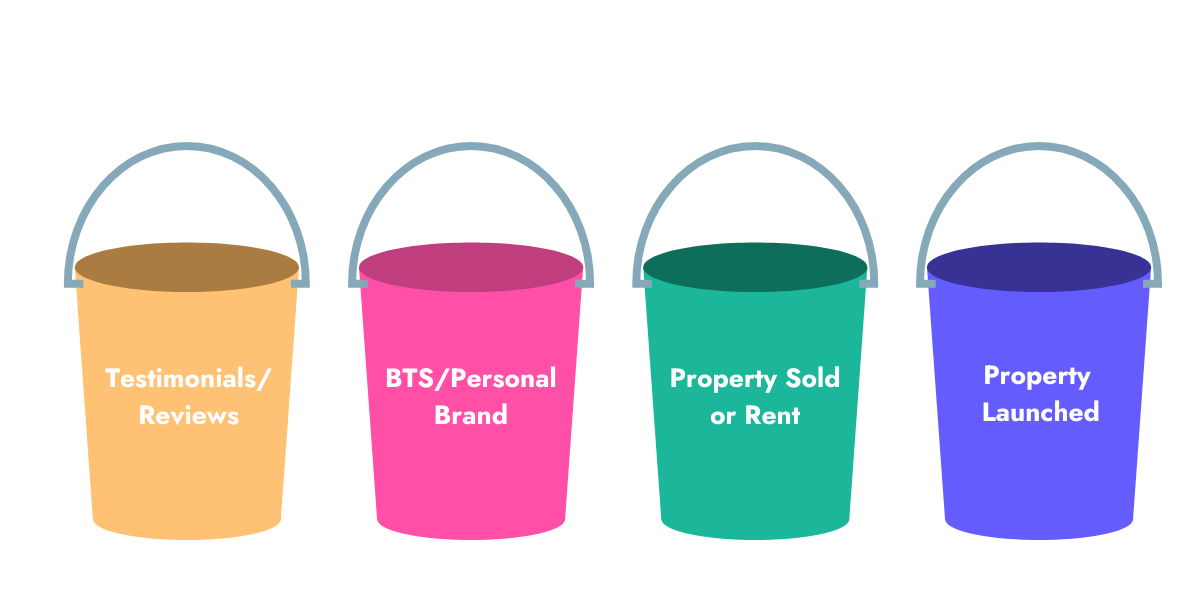
Examples of content buckets are:
Property For Sale/Rent
This content is focused on highlighting a recently launched property. You want to ensure you showcase a range of property types and areas throughout the month. This will present the diversity of your agency’s portfolio and connect you with all of your target audience.
Behind The Scenes/Personal Brand
This content is about showcasing you as an agent and building rapport through content. It’s a good opportunity to be playful with your content and develop an emotional connection with your audience.
Property Has Been Sold/Rented
This is an opportunity to highlight your success as an agent. After all, this is what your clients will ultimately care about. Update audiences on properties that have been sold or rented on a weekly basis to showcase your ability to market properties well.
Testimonials/Reviews
Nothing is more persuasive than a genuine and positive account of a client’s experience with you as their agent. Start building a stock of testimonials from past clients so you can post them regularly to build credibility and trust with followers.
Market Updates & Local Insights
The general public are always inquisitive about house prices and property trends, so posting market updates will naturally feed into their curiosity. Communicate if house prices have risen where you operate. Knowing their home is rising in value can encourage enquiries.
Have a monthly plan
Now that you know why you’re using social media, who you are speaking to, which social channel to use and what kinds of content you’re creating, you need a posting plan.
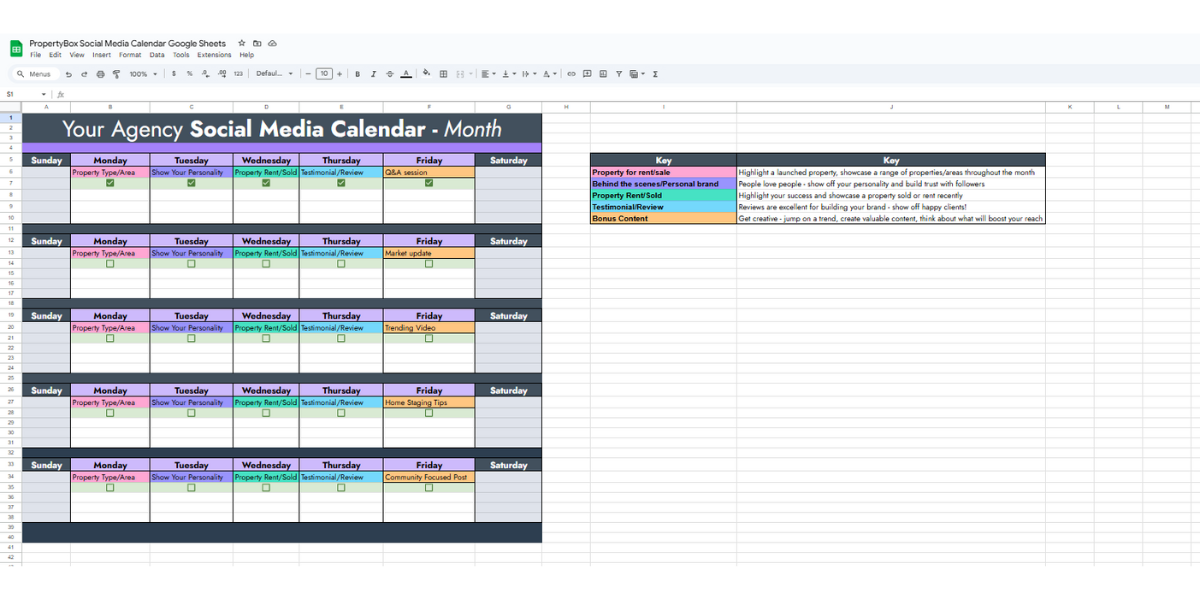
Developing a monthly content calendar helps you outline what to post and when, helping maintain posting consistency and a balanced mix of content types.
Aim for a variety of formats including images and videos to keep the feed interesting and to test what performs on each social platform.
There are numerous tools you can use to build a content calendar, including Trello or Notion.
However, if you want to avoid paying for another tool, Google Sheets or Excel are great tools to create a customisable content calendar.
Create a social media posting method
Sometimes, hitting ‘post’ can feel overwhelming, causing it to slip down your to-do list.
However, this is ultimately the most important part of building a presence on social media. If you’re not posting, you’re not going to grow your visibility.
Schedule time and stick to it
If you’re serious about growing on social media, schedule time to create and post.
Doing this at the same time, every day, preferably early, will improve the likelihood of consistency and help social media marketing become part of your daily routine.
You could also do the same for social media engagement, and pencil in a regular window of your day you dedicate to engaging with your audience and other relevant accounts.
💡 Bonus tip: Use a scheduler to help schedule posts in advance. There are plenty of scheduling tools like Buffer and PropertyBox that help simplify the posting process.
Measure success
You’ve set your goals, now you need to track whether your social activity is doing what you set out to do.
This way, you can analyse your posts and do more of what is working, and less of what is not.
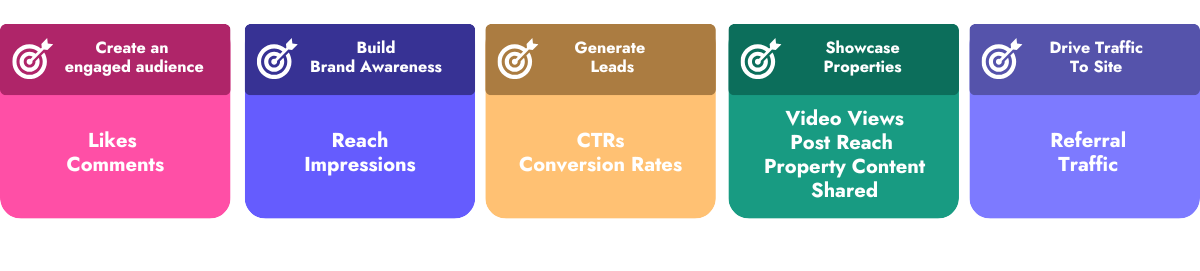
Examples of your potential goals as an agent, and supporting metrics include:
- Creating an engaged audience: Look at engagement metrics such as likes and comments
- Increase brand awareness: Monitor your post’s reach and impressions
- Generate leads: Track conversion rates and click throughs
- Showcase properties: Keep an eye on video views, post reach and property content shares
- Drive traffic to your site: Track referral traffic
Most social media platforms have ways you can view content metrics natively on the platform, which you could then collate to assess content strategy performance.
You can also use social monitoring platforms like Sprout Social to make this process less manual.
💡 Bonus tip: PropertyBox consolidates your metrics from social accounts for all content shared through the platform, making your social monitoring even easier.
Once you have your data, you can review how each content piece is supporting your goals. Then simply scale what your audience appears to like, and cut down on what isn’t gaining traction.
Common social media mistakes to avoid
Posting on private accounts is very different to social media management for estate agents. You’ll need a marketing strategy, attention to detail and persistence to see returns. You should avoid these common mistakes:
- Scattergun posting: inconsistent activity is a red flag, especially among movers who equate active posting with a switched-on agent.
- Only posting listings: a ‘dry’ feed that lacks personality or behind-the-scenes content can feel robotic and dull.
- Ignoring comments and DMs: potential clients will be judging you on your responsiveness, so don’t ignore enquiries.
- AI slop content without review: posting AI-generated copy with errors marks out agents as lazy – and that damages trust.
- Never checking performance: monitoring the engagement and reach of each post stops agents churning out content that misses the mark.
Using video and AI tools to save time and build an efficient system
AI advancements mean you won’t have to hire a professional camera crew and hotshot editor to produce property videos suitable for social media.
Take PropertyBox’s social media campaign builder, for example. Simply choose a theme (coming soon or price reduced, for example) and a template style. Next, drag your images into the video timeline, before adding captions and your logo. A video will be automatically generated in multiple formats/aspect ratios to suit different social media platforms.
Conclusion
By implementing these strategies, estate agents can simplify their social media posting process while enhancing their engagement with potential clients. A well-planned approach that leverages scheduling tools, engages audiences, and adapts to trends will not only save time but also build a stronger online presence. This will help you stand out in the competitive real estate market, helping you to achieve your agency’s goals.
👋 Need help with getting started with social media?
Luck for you, PropertyBox has be created to help agents just like you! From floor plans and photography to scroll-stopping social media content and publishing. Get started today!
Frequently Asked Questions
How much time should an agency realistically budget for social media each week?
There’s no fixed number – but you should be able to manage well with a short daily slot for scheduling and engagement plus a longer weekly session for planning and batch-creating content. Using templates and scheduling tools like those at PropertyBox cuts the time needed to stay consistent.
What’s a realistic posting frequency for a small agency team?
There isn’t one frequency that suits every agency, but a widely used starting point is three to four posts a week across your content buckets. Consistency matters more than volume, since irregular bursts of activity look less credible. It’s better to commit to a pace you can maintain long-term than to overcommit and then stop.
Do I need professional photos for social media, or will phone photos work?
Phone photos work well for behind-the-scenes and personal content, where authenticity is essential. Even so, when you’re posting photos of your property listings, these should come from the same professional selection of images you use on your property portals. Mixing both these styles across your content buckets tends to work best.
What can an agent do if there isn’t time to create content in-house?
PropertyBox’s tools can turn existing photos from your listings into branded, platform-ready videos and posts without needing a camera crew or editor (which removes much of the manual work). Scheduling tools also help by letting you batch-create a week or month of content in one sitting rather than posting reactively every day, which keeps the feed consistent, even during busy periods.